Ethical and responsibility considerations

Femke Zwart, Uncategorized

As our target group is 12+ we need to consider that we do not shock them with the information given and ensure that the shown items are not always reality.

We created a 360º for one of the locations during the scavenger hunt, this 360 shows that location but then how it would look if it would be bombed right now. To show how it would’ve looked like when in it was bombed in the past. But this 360º is not really how it looked like when it was bombed in the war.

The other information given through out the scavenger hunt are based on facts we received from the eldest city guide in Enschede, and researched on the internet. Which means that these facts are based on the reality.

The children will be educated with these facts and not be told anything that isn’t real besides the 360º

Other responsibility considerations are our animation videos, the animations and illustrations are created by Rene and Dennis which mean that we can just use them and put them on youtube as they are created by ourselves.

Some images we have used are from the internet, this means they have copyright however we use them for educational purposes and do not have any commercial benefit from it therefore we can use these images.

We have used music in some animations , they have copyright however we use them for educational purposes and do not have any commercial benefit from it therefore we can use the music.

Our logo is also our own, it was created by Dennis which mean we can use it any where for any purpose.

The font is Clarendon Condensed Bold we are also using this under “educational purposes”. The design colors are in no way related to peaky blinders itself and do not infringe copyright there.

We used Peaky Blinders as a thematic point and did not intend any infringement. Moreover we did not copy 1 on 1 and use our images and style as educational purposes without earning any money and generating income.

Testing Geolocations in the citycenter

Uncategorized

We are approaching the end of the project. The site, animations and the safe are almost done! Before we want to publish our scavanger hunt to the public we wanted to test our geolocations.

We started at Koelink where our stand will be placed. Sinan enabled a dialogue of notifications, because then we could see how far away we were from the actual place.

Sinan fine tuned the locations after the test, and we are very confident that our scavanger hunt will work very well.

Below this text you can see some screen shots of how close we actually were from the Bolwerk point.

Decorations

Femke Zwart, Uncategorized

To develop our idea further, we decided to add several decorations to the safe. The safe needed some decorations as it looked just like a grey box with some buttons.

The decorations are an extra add to the look and feel of the safe, it looks more in the 1920s style that we wanted the audience to see.

The decorations consist of a frame with our name engraved to it, a door handle to be able to open the safe, a wooden circle to cover the safe door which was not cut entirely round so we covered it with wood so it looks better and as extra decoration. we added 5 circles around the potmeters with numbers to know which number you are entering and 5 knobs with an arrow to indicate which number they are entering. The other decorations we have are curly lines to add an extra touch to the safe.

Stitching the Voice-over

Uncategorized

Before we can use the VO we recorded, we need to cut and stitch all the sounds together. For every video Rene (due the animations) cut al the recorded material and stitched it together. Every recording has a different peak in sound level. I needed to level all the peaks for the videos to make it more coherent. There are always false takes or mistakes, I needed to sort these out and make it one good take.

I used premiere, because then I could align the animation better to the sound. Next to the stitching I check if every VO is correct and complete. I check the VO together with the online script.

Finalized Voice-over script

Uncategorized

Ruben changed the script with the new information we gathered via the city tour give by Frits. We all decided to remove the javascript game and replace it with a nice and unexpected question. This to get as much (what we thought) information about Enschede. We kind of changed the subject to be more of a guessing question so that the user is more or less surprised of the correct answer.

We finalized the script and we recorded Max Schippers’ voice and it fits our concept way better than the original voice of Ruben.

This is the finalized script + question (excluding the introduction video, that stayed the same):

Locatie 1 (Grote kerk)

Hi and welcome at our first location. I have a task for you, but before that, you have to have a bit more knowledge about this church. Let me tell you about it:

This church was built in 1200 for the first time. This church has a sundial at the right side of the building. Beneath the sundial there’s a stone with some old text, if you find every capital letter and place them after each other it reads: MCMXVIII, which stand for the year the sundial was made (1918). This place including this church was bombed 61 times during the second world war but how many times was this placed bombed by the Germans? Answer correctly and get the first dial to unlock the safe. 

Vraag : How many times, out of 61, was this place bombed by the Germans?

Answer 1: 32x , it was sometimes mistaken for a german city

Answer 2: 61x , it were alway the germans

Answer 3: 0x , it were always the allies

Locatie 2 (Brand Monument) 

Hello and welcome at our next stop: Het Brandmonument. This is a monument in the city center of Enschede. In 1862 a lot of the city was burned down. The roofs were decorated at the time with pine branches because of the visit of King Willem the third. The fire spread quickly because of the fact that 85% of the houses were made entirely out of wood. But how, according to the legend, did the fire start? If you can answer this question, you will get the next dial to unlock the safe!

Vraag: According to the legend, how did the fire start?

Answer 1: A woman was making pancakes
Answer 2: A man accidentally started fire by dropping a lit cigarette
Answer 3: It was because of an electrical malfunction in a large factory
Answer 4: A bonfire got out of control and set the entire city on fire

Location 3 (Bolwerk)

Welcome to my local pub! I  like to drink my beers with my friends here. I will tell you a little bit more about the oldest and coolest pub of enschede. After you get the answer right we will head to the next spot. The french word “boulevard” is a derivative of the dutch word bolwerk, a bolwerk is a word for a defense line. Enschede had 7 of those defense lines, Café Bolwerk being one of them. Willem Wilmink wanted to be buried below this café. Willem Wilmink was Enschede’s most famous poet. One of his poems was about his and also my favorite pub. If you complete this poem, you will get the next dial! 

(Hint: The poem is located inside the cafe somewhere)


’Begraaf mij onder ’t Bolwerk,
want al is crematie netter,
ik wil boven stappen horen
en het lied van ________’

Vraag: Complete the poem: Which word fills the blank and is a song title of Ethel Waters

Answer 1: Cheek to Cheek 

Answer 2: I got rhythm

Answer 3: Under the moon

Answer 4: Stormy Weather

Locatie 4 (3 Ganzen, Bombardement)

This was a heavily bombed place in the 2nd world war. It was totally destroyed back then. Here you can see how it could look if the bombs dropped right now. You have to look very carefully and find the letters to make a word! If you get this seven letter word correct , we can move on!

(360 Photo)

Location 5 (Van Heekplein)

Welcome at the last location! We only have one code to find, but hurry! This is where people shop now but you wouldn’t recognise it if you were here 70 years ago, it was totally bombed! I will tell you a bit more about the person this place is named after.

The square is named after Hendrik Jan van Heek, one of the founders of the Van Heek textile factory. Van heek lived in a villa just behind De grote kerk. He was an influential rich man. He was a big name in the textile scene, but besides making a lot of textile, he was also good at making a lot of other things, especially making children. If you guess how many children he had living with him at villa van heek, we can get the last dial and return to the safe!

Vraag: How many children did Van Heek have?

Answer 1: 13

Answer 2: 10

Answer 3: 4

Answer 4: 7

Walkthrough + Feedback

Uncategorized

We had a walkthrough last Tuesday with Harry and Boris to test our installation which we had at that time. They saw how it triggered and how the user experience is.

Positive feedback were:

  • It was looking good
  • Experience was clear
  • Interaction was clear
  • Hardware was working
  • To quote Harry and Boris: “The best experience walkthrough we have had up to this point”

Some improvement points were:

  • How to secure the buttons
  • The hole was not round so we had to cover it up nicely
  • Cables could or should go behind the installation
  • LED could have been in another place

Of course we are happy and making a lot of good progress. We will embrace the feedback and work on the improvement points

Promotion 2.0

Femke Zwart, Uncategorized

The animation videos that Rene made are being used on social media, to give the audience little sneak previews

Also to give the audience an idea of what we are doing as Sneaky Finders and what our concept is.

The animations are also used to to attract the audience, not only do they give you a preview, they are also used for the user to be intrigued and want to see more of us.

The animations are also to keep the interested and want to see more and play our scavenger hunt. The text used below the animation are: “are you sneaky enough to find us?” which is kind of challenging them to find us.

The other post saying go back in time with Sneaky Finders, this gives away another part of our installation. It shows that we go back in time with the scavenger hunt.

City tour Enschede

Uncategorized

Together with the team we decided to participate in a city tour in Enschede. We participated to get some more information about the city that we can use for our storyline and our questions. Through this tour we hope for information that we cannot find on the Internet, some special facts that only the city guide knew.

Dennis contacted the oldest tour guide he could find, his name was Frits Heijne, he is 83 years old. Frits was a very enthusiastic man and wanted to show us everything Enschede could offer.

We told him that we want to wanted specific information about our questions. The second world war borbardement, bolwerk, old church and the van Heeksquare.

We recorded Frits while he was speaking to ensure we have all the specific information, in case we want to use any of it. Frits told us a lot of facts we did not now, he knows a lot Talking about one subject he also quickly changed topics and went on to other facts, sometimes not useable for our project.

He even went into the Bolwerk like it is his own place, grabbing things off the wall and sitting down to show us more information.

Next to all the information we received we also received al lot of pictures from Fritz that you cant find on the web, such as images from the bombardement and the big church.

Website 5 (PHP + Database)

Sinan Al-Defa'i

In the previous blog post I explained how I made a timer and saved this in a local storage.
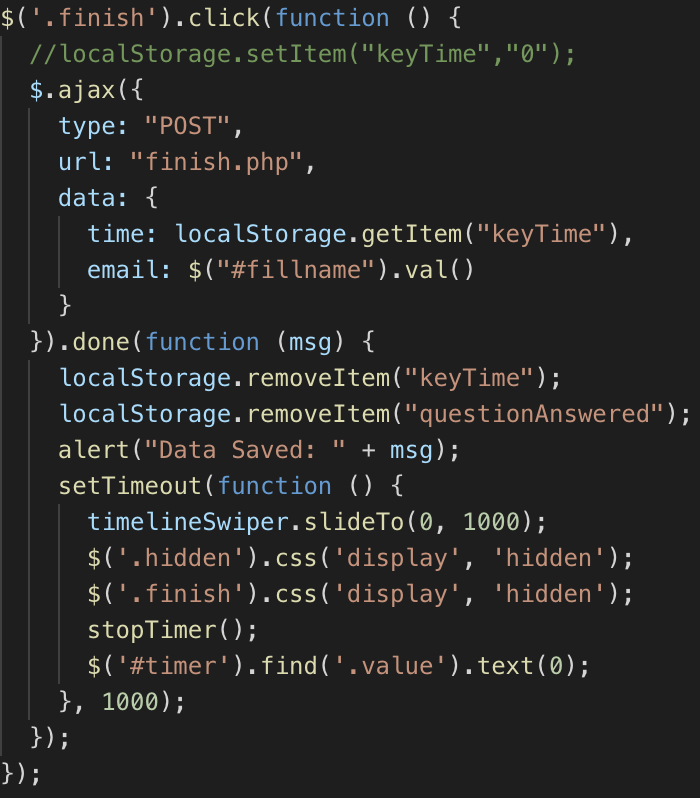
Because I dont want to refresh the whole PHP page I also have to use AJAX to do a post request. When i press the finish button it has to do the post request so i’ll write that function first.

After the button is pressed, an ajax post request is made. I want 2 things to be sent to the database. The time in which he finished the game, and the email filled in the label. These have been passed to a seperate php file called finish.php. If it is done correctly the localStorage should be emptied, the user gets alerted in a way that the data has been saved succesfully. Then the timer has to be stopped, resetted and the slider has to go to the first slide to start again and the user now knows he/she is done.

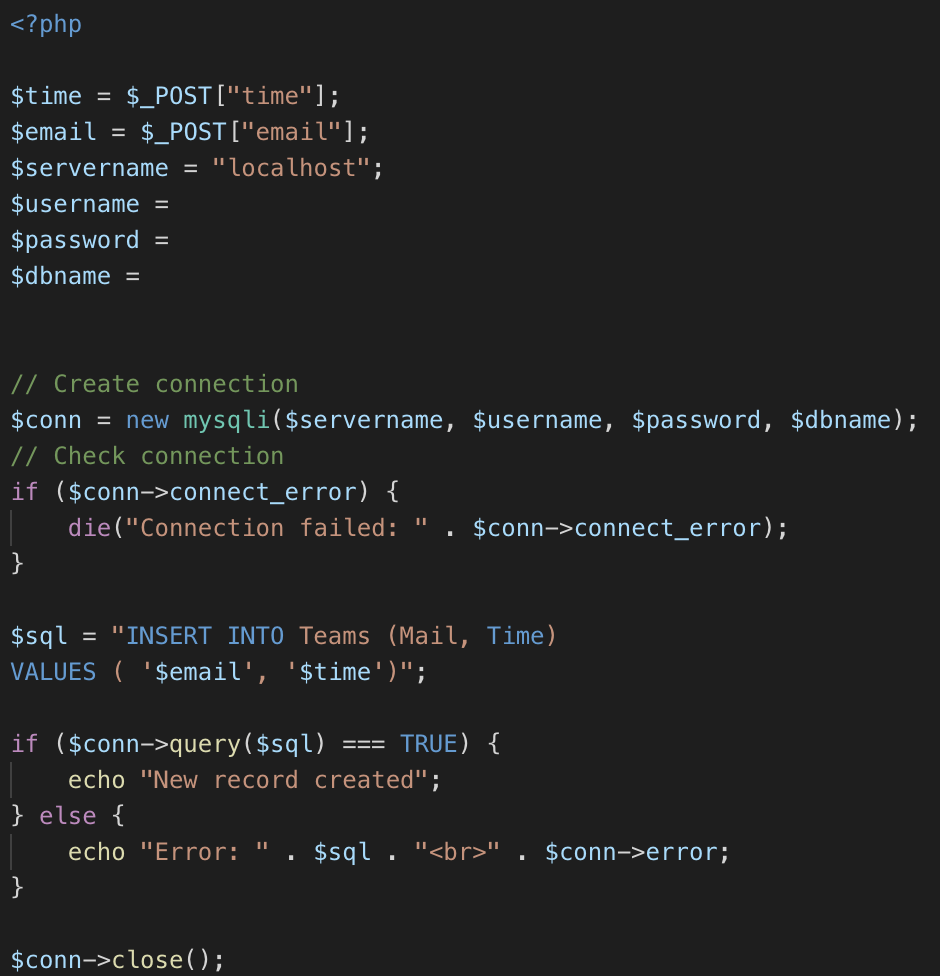
In the finish.php file the data we just sent has to be written to the database. I have already made a database in mysql with some dummy data and 2 columns. One named email and one named time.

First i need to save the sent data to a variable $time and $email. Then we set the correct values for the variables to make a database connection.
I insert the data to the correct tables and send an echo back if this failed or succeeded.
Then i close the connection again.

Website 4 (Local Storage and Timer)

Sinan Al-Defa'i

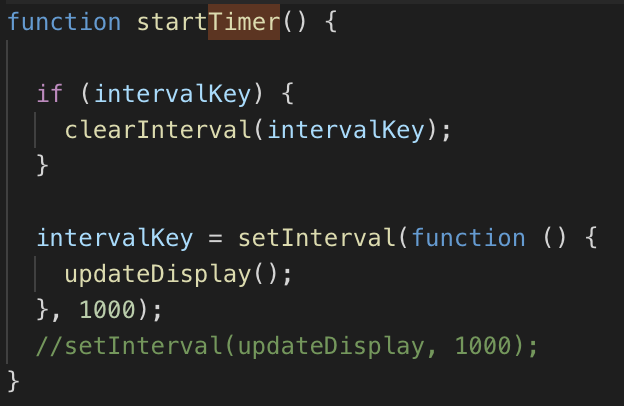
When we thought about the people walking through the city center of Enschede, there isn’t really a challenge. So we decided to add a timer. This timer should start when you stand in front of the installation and press the first button on the website. This timer should be visible at all times to see the time u have spent. You should also see the timer turning red when you answer the incorrect answer. I also want this timer to continue when you lock your phone and then continue. It’s also important to continue at the time you were before you refresh your page, or else you could cheat by resetting the time. Lets first show how we made a timer.

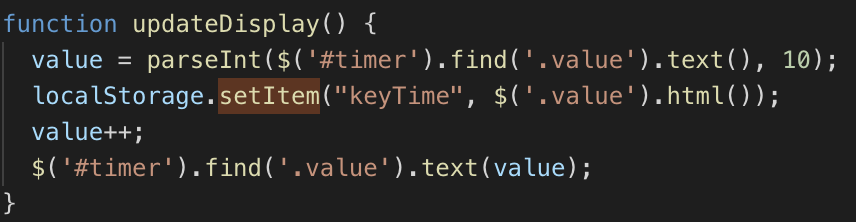
We then save this timer in a variable called value.

And after that we append this value to the div.
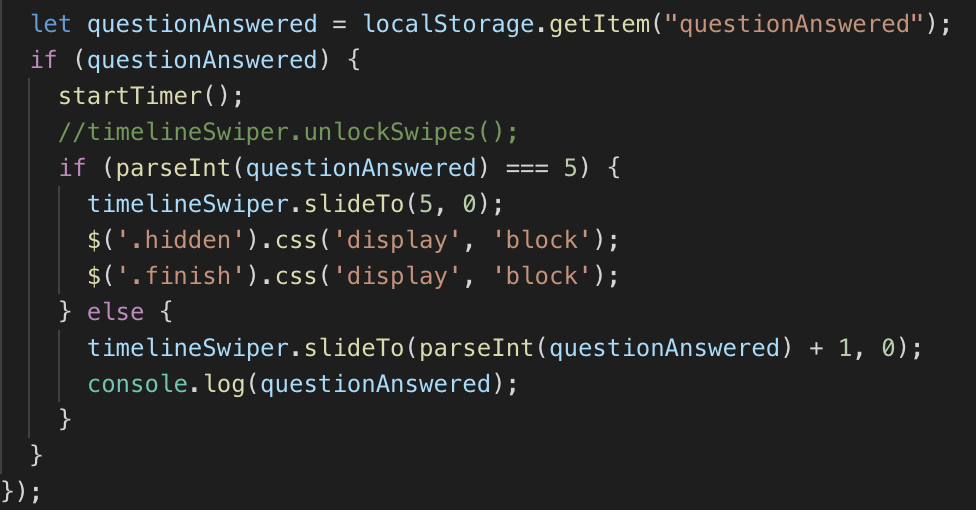
I did some research about the best way to save data locally on the device/browser. I looked into cookies and localstorage, and found that localstorage is better in this case. So now we also save the value in a localstorage. Now we always have access to timer if we need it.
The same thing i do for the slider. Every time a new slide appears i save the index of the current slider in a localStorage. When searching through the API documentation i found that there is an easy method to get the current slide index. When te page reloads the timer and slide should automatically continue where it was before reloading .

In the next blogpost i will explain how i saved the timer in a database through PHP.